SPEEDING UP FASTQ PREPROCESSING WITH FASTP
SYSTEM / BIOINFORMATICS / DOCKER / GENOMICS
Speeding Up FASTQ Preprocessing with FastP
In next-generation sequencing (NGS) workflows, clean data is critical. Low-quality reads, adapter sequences, and other artifacts can heavily impact downstream analyses like genome assembly, transcript quantification, or variant calling. FastP is a modern, ultra-efficient tool that performs both quality control and read cleaning — all in a single fast pass through your FASTQ files. Let's dive into how you can install and use FastP for your omics pipelines!
What is FastP?
FastP is an all-in-one FASTQ preprocessing tool written in C++ designed for maximum speed and minimal memory usage. Whether you're trimming adapters, filtering poor-quality reads, or visualizing sequencing quality, FastP handles it all — and does it very quickly.
FastP highlights:
- Adapter trimming (automatic detection for paired-end reads)
- Base quality filtering (Phred score based)
- Length filtering (minimum read length enforcement)
- Low complexity read filtering
- Overlapping paired-end read correction
- Comprehensive quality reports (HTML + JSON)
Why Choose FastP?
- 🚀 Lightning speed: Preprocess large FASTQ files in minutes, not hours.
- 🛠 Built-in quality control: Get clean data and QC reports without extra tools.
- 🧹 All-in-one solution: No need to chain multiple tools like cutadapt + Trimmomatic + FastQC.
- ☁️ Cloud ready: Easily containerized with Docker for scalable workflows.
- 🛠 Frequent updates: Actively maintained by the community.
Installing FastP
🐍 Conda Local Installation
-
Install FastP using conda:
conda install -c bioconda fastp=0.24.1or, if you prefer mamba:
mamba install -c bioconda fastp=0.24.1 -
Verify the installation:
fastp --versionThis should return the version number, e.g.,
fastp 0.24.1.Notes: If you are using a conda environment, make sure to activate it first. Also, if you are using a different version of FastP, adjust the version number accordingly.
🐳 Docker Local Installation
This installs FastP v0.24.1 inside a lightweight container — perfect for local or cloud workflows. To build the Docker image:
-
Create a
Dockerfile.fastpin your working directory.Example Dockerfile for FastP
FROM mambaorg/micromamba:2.0-debian11 RUN micromamba install -c bioconda -c conda-forge fastp==0.24.1 \ && micromamba clean -a -y -
Build the Docker image:
docker build \ -f Dockerfile.fastp \ -t fastp:0.24.1 . -
Verify the installation:
docker run --rm fastp:0.24.1 fastp --versionThis should return the version number, e.g.,
fastp 0.24.1.Notes: If you are using a different version of FastP, adjust the version number accordingly.
☁️ Cloud Deployment (Google Cloud Platform)
-
Build the image locally as shown above.
-
Tag it for GCP Artifact Registry:
docker tag fastp:0.24.1 us-central1-docker.pkg.dev/my-project-id/my-repo/fastp:0.24.1 -
Push it to the Artifact Registry:
docker push us-central1-docker.pkg.dev/my-project-id/my-repo/fastp:0.24.1Ensure you have
gcloudCLI installed and configured for authentication.
Running FastP on Sample Data
📥 Download Test FASTQ Files
Let's grab a paired-end dataset for Bacillus subtilis ALBA01 strain from the European Nucleotide Archive:
# Make data directory if it doesn't exist,
mkdir -p data
# Download FASTQ files for Bacillus subtilis ALBA01
wget -nc -P ./data ftp://ftp.sra.ebi.ac.uk/vol1/fastq/SRR331/005/SRR3317165/SRR3317165_1.fastq.gz
wget -nc -P ./data ftp://ftp.sra.ebi.ac.uk/vol1/fastq/SRR331/005/SRR3317165/SRR3317165_2.fastq.gz
🚀 Process with FastP (Docker)
Now let's run preprocessing:
docker run --rm -it \
  -v "$(pwd):/app" \
  --user 1000:1000 \
  fastp:0.24.1 \
  bash -c '
    fastp \
      --in1 "/app/data/SRR3317165_1.fastq.gz" \
      --in2 "/app/data/SRR3317165_2.fastq.gz" \
      --out1 "/app/data/SRR3317165_1.trim.fastq.gz" \
      --out2 "/app/data/SRR3317165_2.trim.fastq.gz" \
      --unpaired1 "/app/data/SRR3317165_1.trim_up.fastq.gz" \
      --unpaired2 "/app/data/SRR3317165_2.trim_up.fastq.gz" \
      --qualified_quality_phred 20 \
      --detect_adapter_for_pe \
      --length_required 50 \
      --correction \
      --low_complexity_filter \
      --complexity_threshold 30 \
      --html /app/data/fastp.html \
      --json /app/data/fastp.json \
      --thread 16'
📂 Output Files
FastP will generate:
| File | Description |
|---|---|
SRR3317165_1.trim.fastq.gz |
Trimmed forward reads |
SRR3317165_2.trim.fastq.gz |
Trimmed reverse reads |
SRR3317165_1.trim_up.fastq.gz |
Unpaired forward reads |
SRR3317165_2.trim_up.fastq.gz |
Unpaired reverse reads |
fastp.html |
Interactive QC report |
fastp.json |
Machine-readable QC report |
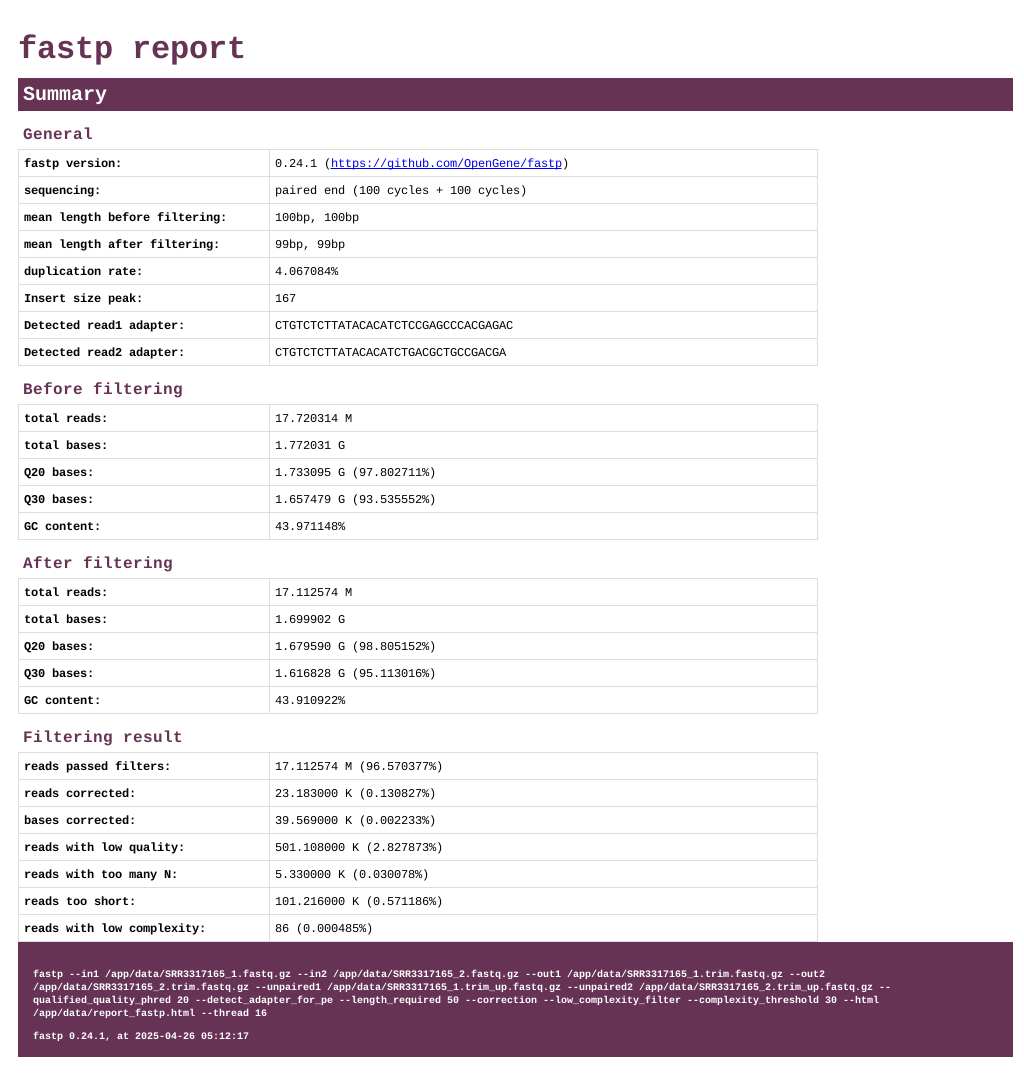
📊 Quality Report
Key FastP Parameters You Should Know
| Parameter | Purpose |
|---|---|
--in1 / --in2 |
Input FASTQ files |
--out1 / --out2 |
Output trimmed FASTQ files |
--qualified_quality_phred |
Base quality threshold (default 15) |
--detect_adapter_for_pe |
Auto-detect adapters for paired-end reads |
--correction |
Overlapping read correction |
--length_required |
Minimum length to keep read |
--low_complexity_filter |
Remove low complexity sequences |
--html |
Generate HTML QC report |
--thread |
Number of threads for multithreading |
FastP in Your Omics Workflow
A standard workflow incorporating FastP would look like this:
- Raw Data QC: Run FastQC-RS to assess unprocessed reads.
- Preprocessing: Run FastP to trim adapters, filter reads, and generate clean datasets.
- Post-QC: Run FastQC-RS again to confirm data quality improvements.
- Analysis: Proceed to alignment, assembly, or quantification steps.
🎯 Conclusion
FastP is an amazing tool for sequencing data preprocessing — ultra-fast, user-friendly, and packed with features. If you are building NGS workflows for genomics, transcriptomics, or metagenomics projects, FastP is the perfect starting point for producing high-quality, reliable datasets.
Clean data leads to better science!