FASTQC-RS: QUALITY CONTROL FOR OMICS DATA
SYSTEM / DOCKER / BIOINFORMATICS / GENOMICS
Mastering Quality Control in Omics with FastQC-RS
High-throughput sequencing generates massive amounts of data, but raw reads can contain errors, adapter remnants or biases that compromise downstream analyses. Performing quality control (QC) on FASTQ files before and after trimming is essential to catch these issues early. FastQC-RS is a modern, Rust-based QC tool that delivers fast, reliable assessments and easy-to-read HTML reports—perfect for genomics and transcriptomics workflows.
What Is FastQC-RS?
FastQC-RS is a command-line utility, inspired by the original FastQC, that scans FASTQ files and generates detailed QC summaries. Written in Rust, it offers:
- Speed: Rapid analysis even on large files
- Efficiency: Low memory footprint and minimal CPU load
- Active development: Frequent releases with new features and fixes
Key Features of FastQC
Key Features
FastQC-RS evaluates multiple aspects of your sequencing data and produces intuitive graphs and tables.
Basic Statistics
Provides an overview of each file:
- Total reads
- Average read length
- Average GC content

| Metric | Value |
|---|---|
| Total reads | 8,860,157 |
| Average read length | 100 |
| Average GC content | 44% |
| File name | SRR3317165_1.fastq.gz |
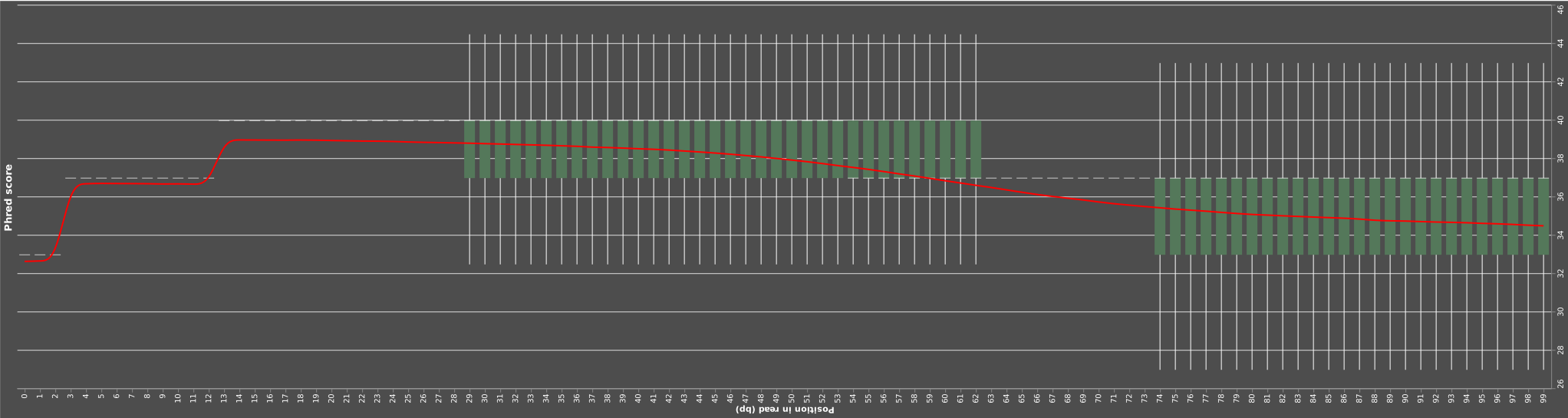
Shows quality (Phred) scores at each position in the read:
Per-sequence GC Content
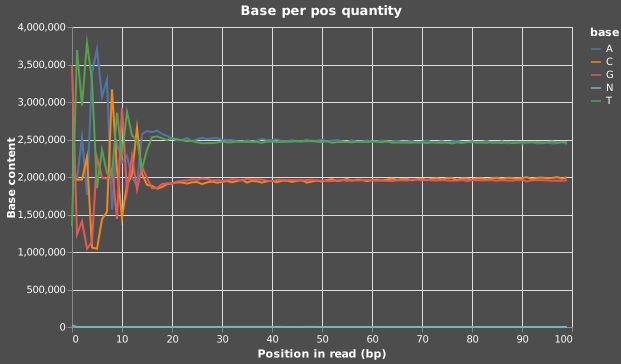
Detects unusual GC patterns that may indicate contamination or bias:
Why Choose FastQC-RS?
- Rust-powered performance: Faster scans with lower resource use
- Clear HTML reports: Eye-catching visuals with minimal interpretation overhead
- Workflow integration: Plug in easily to Snakemake, Nextflow, Galaxy, etc.
- Frequent updates: Active community and regular improvements
Installing FastQC-RS
🐍 Conda Local Installation
Like most other genomics and transcriptomics software, FastQC is straightforward to install using any flavor of conda. My particular favorite for licensing purposes and improved speed is mamba, but conda and anaconda will also work.
-
Install FastQC-RS using conda or mamba:
# Using Conda or Anaconda
conda install -c bioconda -c conda-forge fastqc
# Using mamba mamba install -c bioconda -c conda-forge fastqc -
Verify the installation:
fastqc --versionThis should return the version number, e.g.,
fastqc 0.3.4.Notes: If you are using a conda environment, make sure to activate it first. Also, if you are using a different version of FastQC-RS, adjust the version number accordingly.
🐳 Docker Local Installation
A containerized setup ensures reproducibility and portability:
-
Create a
dockerfile.fastqcrsin your working directory.Example Dockerfile for FastQC-RS
Here I provide a dockerfile that you can use to install FastQC-RS in a relatively slim image. For more examples, go to my [`SeqContainerLab`](https://github.com/gabenavarro/SeqContainerLab) repository. To install with the one provided below, just copy and paste Docker build code below into an empty file and save it as `dockerfile.fastqcrs`FROM mambaorg/micromamba:2.0-debian11 RUN micromamba install \ -c bioconda \ -c conda-forge \ fastqc-rs==0.3.4 \ && micromamba clean -a -y
Using dockerfile.fastqcrs above, run the following commdan to build.
docker build \
-f ./dockerfile.fastqcrs \
-t fastqc-rs:0.3.4 .
Basic Usage Example
First, download example FASTQ files from the European Nucleotide Archive (ENA).
# Make directory, to download your data into
mkdir data
# Download FASTQ files for Bacillus subtilis ALBA01
wget -nc -P ./data ftp://ftp.sra.ebi.ac.uk/vol1/fastq/SRR331/005/SRR3317165/SRR3317165_1.fastq.gz
wget -nc -P ./data ftp://ftp.sra.ebi.ac.uk/vol1/fastq/SRR331/005/SRR3317165/SRR3317165_2.fastq.gz
Now that we have the data, lets go through two examples. Conda and Docker installed FastQC.
Conda
For the conda environment, its pretty straightforwrad. Just run the following command.
fqc -q ./data/SRR3317165_1.fastq.gz > ./data/SRR3317165_1.html
-q ./data/SRR3317165_1.fastq.gz: The FASTQ file to be assessed.> ./data/SRR3317165_1.html: Specifies the directory for output report.
Docker
For the Docker environment, the command gets a bit more involved, but dont sweat it. It works all the same, and since its in a Docker environment its much easier to plug into a cloud based pipeline.
docker run --rm -it \
  -v "$(pwd):/app" \
  fastqc-rs:0.3.4 \
  --user 1000:1000 \
  bash -c \
  "fqc -q /app/data/SRR3317165_1.fastq.gz > /app/data/SRR3317165_1.html"
Integrating FastQC-RS into Your Workflow
FastQC-RS is ideally used in conjunction with preprocessing tools like fastp or Trimmomatic. Typically, you would:
- Run FastQC-RS to assess initial data quality.
- Preprocess (e.g., adapter trimming, quality filtering).
- Re-run FastQC-RS to confirm data improvements.
Conclusion
FastQC remains indispensable in modern bioinformatics, providing clear, actionable insights into sequencing data quality. Integrating FastQC into your omics workflows helps ensure robust and reliable data analysis outcomes.
Happy sequencing and quality checking!
References: